Let us know how we can help
Sales & Pricing
Speak to a rep about your business needs

Help & Support
See our product support options
General inquiries and locations
Contact us


 Control-M + AWS DataSync
Your AWS DataSync workflow starts before a task execution ever transfers a byte — and it can fail when something upstream breaks. An AWS Glue job never writes its output files to the source Amazon S3 bucket. An AWS Database Migration Service replication task runs past its transfer window. Control-M orchestrates the full chain: Amazon S3 data landing, AWS Glue transformation, AWS DataSync execution, and Amazon FSx delivery.
common workflow issues
Does this sound like your week?
PRE-TRANSFER READINESS
Your transfer window opens. The source files still haven't arrived.
Control-M continuously evaluates upstream dependencies—including file arrival, extraction jobs, and validation workflows—before launching AWS DataSync. Instead of starting incomplete transfers, it automatically waits, alerts when required, and begins execution only when every prerequisite has been satisfied.
FAILED TRANSFERS
The network recovered. Your interrupted DataSync task never resumed.
Control-M detects unsuccessful task completion, applies configurable retry policies, and prevents downstream workflows from executing until the transfer succeeds. Operations teams recover automatically without manually restarting jobs or reconciling partially completed workflows.
CROSS-PLATFORM WORKFLOWS
Data reached Amazon S3. Your downstream processing never started.
Control-M captures AWS DataSync completion status, verifies successful transfer outcomes, and immediately triggers downstream workloads such as ETL jobs, analytics pipelines, database updates, or application processing without relying on custom scripts or polling.
SLA MANAGEMENT
Overnight transfers ran long. Nobody noticed until business users called.
Control-M tracks transfer execution against defined SLA targets, predicts potential breaches before deadlines are missed, and escalates issues through operational notifications. Teams gain time to resolve delays before they affect downstream business processes.
OPERATIONAL VISIBILITY
Five systems completed work. Nobody knows where today's workflow stopped.
Control-M provides centralized visibility across the entire workflow—from source preparation through AWS DataSync and downstream processing—with dependency mapping, execution history, and real-time status so operators can identify failures without investigating multiple consoles.
Control‑M + AWS DataSync
Control‑M + AWS DataSync
|
Platform & OS coverage |
AWS · Amazon EC2 · Amazon EFS · Amazon FSx · Amazon S3 · NFS · SMB · Object storage · Hybrid on-premises and cloud environments |
|
Job types supported |
AWS DataSync task execution · file transfer · data migration · data replication · storage synchronization · cloud migration workflow · post-transfer automation · scheduled batch workflows |
|
SLA monitoring & alerting |
SLA window definition · breach prediction · priority-based escalation · automated retry · email notifications · Communication Suite (Teams, Slack, Telegram, WhatsApp) · PagerDuty integration · Atlassian Jira integration |
|
Audit trail & access controls |
job execution history · role-based access control (RBAC) · centralized audit logging · execution timestamps · approval workflows · operational reporting · compliance-ready audit trail |
end-to-end orchestration
One production workflow. Every tool in the stack.
Control-M orchestrates workflows across AWS DataSync, Amazon S3, Amazon EFS, Amazon FSx, file transfers, enterprise applications, and cloud services in a single job flow—with dependency tracking, SLA visibility, and automated recovery across all of them.
- Cross-tool dependency: Source data extraction → validation → AWS DataSync transfer → Amazon S3 → downstream ETL and analytics
- Data-aware triggers: : File arrival, API event, upstream job completion, AWS DataSync task completion
|
AWS DataSync |
Execute transfer tasks · monitor execution status · detect completion or failure · trigger downstream workflows |
|
Amazon S3 |
Validate file arrival · trigger processing · monitor object availability · coordinate downstream dependencies |
|
Amazon EFS |
Synchronize file systems · automate scheduled transfers · validate source availability |
|
Amazon FSx |
Coordinate storage synchronization · orchestrate migration workflows · monitor transfer completion |
|
Enterprise Applications |
Trigger exports · validate prerequisite jobs · coordinate cross-platform workflows |
|
ETL & Analytics Platforms |
Launch processing after successful transfers · prevent downstream execution on failure · manage workflow dependencies |
|
Notification & ITSM Tools |
Send SLA alerts · create incidents · escalate failed workflows · notify operations teams |
airflow coexistance
Control-M doesn’t replace your Airflow DAGs. It runs the layer above them.
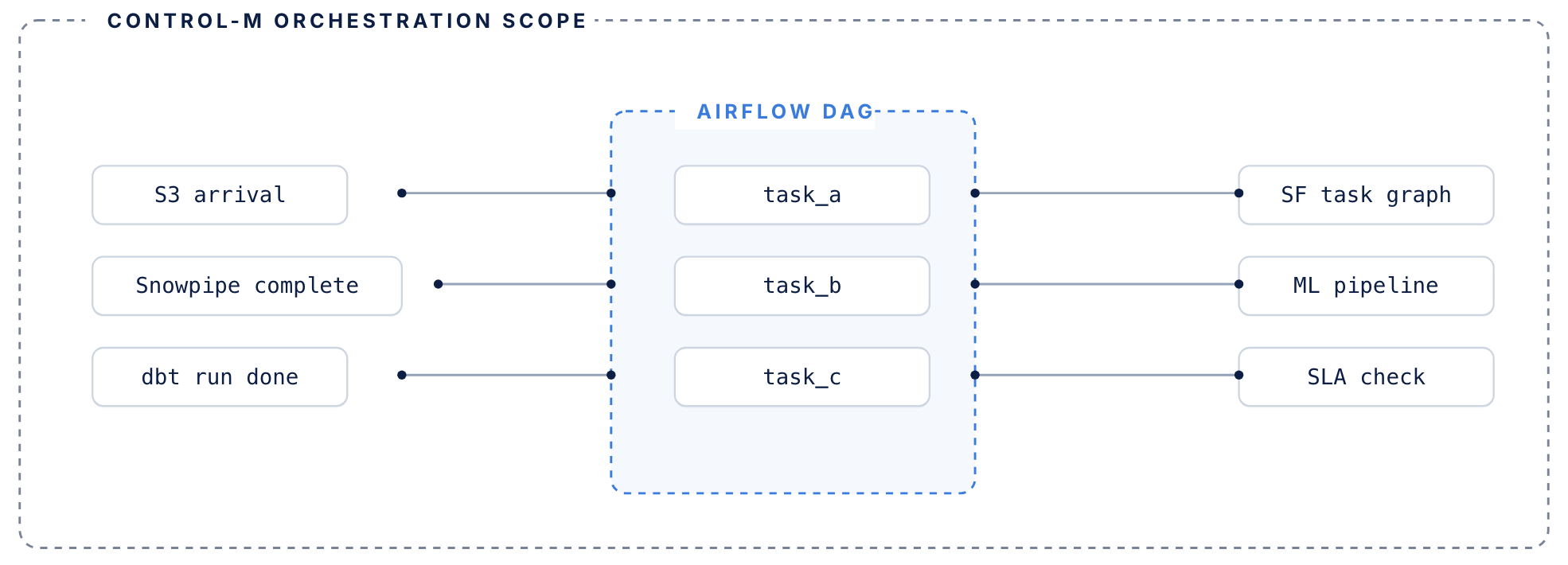
Airflow manages its DAG. Control-M manages everything surrounding it.
AIRFLOW HANDLES
DAG-level orchestration inside the data pipeline
- DAG-level task orchestration within data pipelines
- Python operators, sensors, and task dependencies
- Execution graph for jobs that run inside your pipeline
- Manages retries within a single DAG context
control-m adds
The coordination layer around your DAGs
- Coordination layer around DAGs — triggers Airflow based on upstream conditions: file arrivals, API events, other tool completions
- Tracks each DAG’s SLA contribution across the full end-to-end workflow, not just its own routine
- Manages failure recovery when upstream dependencies fail before Airflow even starts
- Existing DAGs don’t need to be rewritten or migrated
MONITOR TRANSFERS
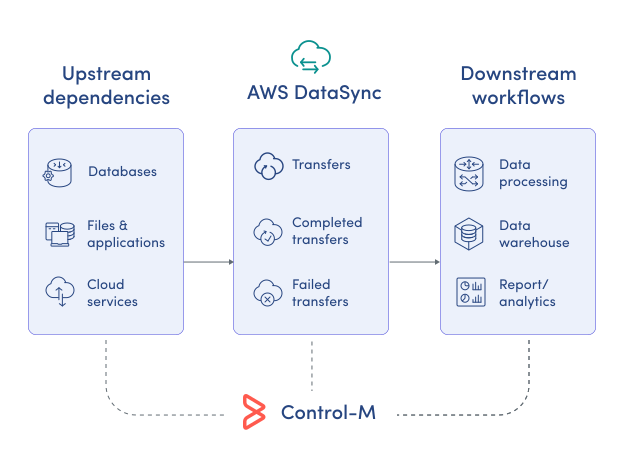
Monitor AWS DataSync transfers and workflow status from one place.
AWS DataSync provides task-level visibility, but enterprise operations span far beyond individual transfers. Control-M delivers a centralized operational view across upstream dependencies, AWS DataSync execution, and downstream workflows, giving operators complete end-to-end visibility with actionable insights:
-
End-to-end workflow visibility
-
Real-time execution status
-
Upstream and downstream dependencies
-
Transfer history and audit logs
-
SLA risk indicators
AUTOMATED RECOVERY
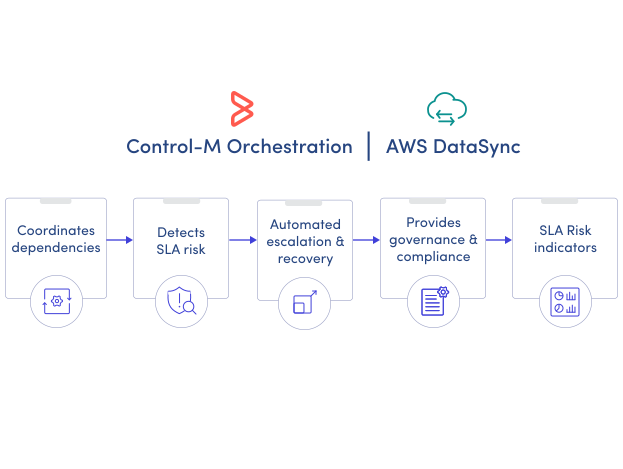
Keep AWS DataSync workflows moving without manual intervention.
AWS DataSync reports task outcomes but doesn't orchestrate recovery across the broader business workflow. Control-M automatically detects failures, applies recovery policies, protects downstream processes, and resumes orchestration when conditions are met, improving operational resilience through:
-
Configurable retry policies
-
Dependency-aware recovery
-
Downstream cascade prevention
-
Automated SLA notifications
-
Policy-driven workflow execution
