




TL;DR Summary: Using Kibana enables users to execute queries in ElasticSearch with Lucene and Kibana Query Language (KQL). The guide details how to enter JSON queries, highlighting differences between KQL and Lucene syntax.
- JSON DSL queries can be utilized in Kibana.
- Kibana supports both KQL and Lucene, with key syntax differences.
We have discussed at length how to query ElasticSearch with CURL. Now we show how to do that with Kibana.
You can follow this blog post to populate your ES server with some data.
JSON queries (aka JSON DSL) are what we use with curl. But you can use those with Kibana too. It will not work with aggregations, nested, and other queries.
In using JSON, difference is that you only pass in the query object. So for this curl query:
{"query":{"match":{"geoip.country_name":"Luxembourg"}}}
You would paste in only this portion in Kibana.
{"match":{"geoip.country_name":"Luxembourg"}}
Entering Queries in Kibana
In the Discovery tab in Kibana, paste in the text above, first changing the query language to Lucene from KQL, making sure you select the logstash* index pattern. We discuss the Kibana Query Language (KBL) below.

If you forget to change the query language from KQL to Lucene it will give you the error:
Discover: input.charAt is not a function. (In 'input.charAt(peg$currPos)', 'input.charAt' is undefined)
The easiest way to enter the JSON DSL query is to use the query editor since it creates the query object for you:
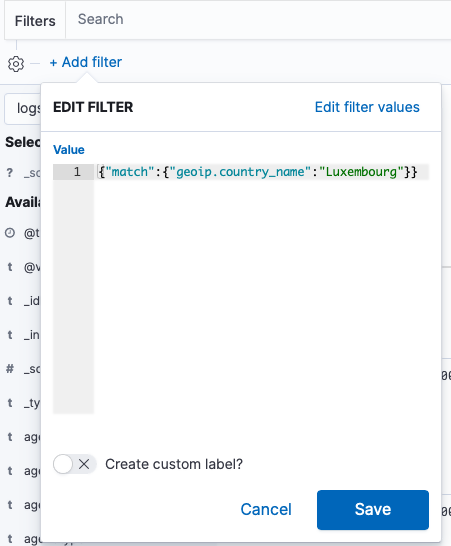
Save the query, giving it some name:

Kibana Query Language (KBL) versus Lucene
You can use KBL or Lucene in Kibana. They are basically the same except that KBL provides some simplification and supports scripting.
Here are some common queries and how you do them in each query language.
| KBL | Lucene | Explanation |
|---|---|---|
| request:"/wordpress/" | request:"/wordpress/" | The colon (:) means equals to. Quotes mean a collection of words, i.e. a phrase. |
| request:/wordpress/ | request:/wordpress/ | Do don't need quotes for one word. |
| request:/wordpress/ | request:/wordpress/ | Do don't need quotes for one word. |
| request:/wordpress/ and response:404 | request:/wordpress/ and response:200 | for KBL you have to explicitly put the boolean operator. For Lucene the operator is not recognized as an operator but as a string of text unless you use write it in capital letters. |
| wordpress | wordpress | Matches based on any text (wordpress in this example) in the document and not a specific field. |
| 200 or 404 | 200 404 | adding the word or to Lucene would also include text containing the string "or." So leave it off or use capital OR. |
| 200 and 404 | 200 AND 404 | Use uppercase with Lucene for logical operators. |
| geoip.country_name: "Luxembourg" | {"match":{"geoip.country_name": "Luxembourg"}} | Lucene supports JSON DSL query language, as we illustrated above |
| response:>=200 and response:< =404 | response:[200 TO 404] | range query |
| kilobytes > 1 | not supported | Scripted field, where kilobytes is: if (doc['bytes'].size()==0) { return 0; } return doc['bytes'].value / 1024; |
ElasticSearch Guide
- ElasticSearch Tutorial for Beginners: ElasticSearch Basics
- Using Apache Hive with ElasticSearch
- Using ElasticSearch with Apache Spark
- Curl ElasticSearch Commands Cheat Sheet
- Spark ElasticSearch Hadoop Update and Upsert Example and Explanation
- How To Write Apache Spark Data to ElasticSearch Using Python
- ElasticSearch Search Syntax and Boolean and Aggregation Searches
- ElasticSearch Nested Queries: How to Search for Embedded Documents
- ElasticSearch Joins: Has_Child, Has_parent query
- How to Setup up an Elastic Version 7 Cluster
- How to Configure Filebeat for nginx and ElasticSearch
- Using Beats and Logstash to Send Logs to ElasticSearch
- How to Load CSV File into ElasticSearch with Logstash
- ElasticSearch Aggregations Explained
- What is the ELK Stack?
- Logstash 101: Using Logstash in a Data Processing Pipeline
- Using Kibana to Execute Queries in ElasticSearch using Lucene and Kibana Query Language
- ElasticSearch Machine Learning
- How to Install Elastic Enterprise Search
- How To Use Elastic Enterprise Search with GitHub
These postings are my own and do not necessarily represent BMC's position, strategies, or opinion.