




TL;DR Summary: Using Apache Spark with Hive enhances data processing speed by leveraging Spark's in-memory capabilities. The guide includes installation prerequisites, configuration steps, and instructions for executing Hive jobs on Spark.
- Prerequisites include installing Hive and Spark, and setting environment variables.
- Instructions cover linking jar files, starting Spark, and running Hive commands.
Here we explain how to use Apache Spark with Hive. That means instead of Hive storing data in Hadoop it stores it in Spark. The reason people use Spark instead of Hadoop is it is an all-memory database. So Hive jobs will run much faster there. Plus it moves programmers toward using a common database if your company runs predominately Spark.
It is also possible to write programs in Spark and use those to connect to Hive data, i.e., go in the opposite direction. But that is not a very likely use case as if you are using Spark you already have bought into the notion of using RDDs (Spark in-memory storage) instead of Hadoop.
Anyway, we discuss the first option here.
Prerequisites and Installation
- You need to install Hive.
- Install Apache Spark from source code (We explain below.) so that you can have a version of Spark without Hive jars already included with it.
- Set HIVE_HOME and SPARK_HOME accordingly.
- Install Hadoop. We do not use it except the Yarn resource scheduler is there and jar files. But Hadoop does not need to be running to use Spark with Hive. However, if you are running a Hive or Spark cluster then you can use Hadoop to distribute jar files to the worker nodes by copying them to the HDFS (Hadoop Distributed File System.)
The instructions here are for Spark 2.2.0 and Hive 2.3.0. Just swap the directory and jar file names below to match the versions you are using. Note that when you go looking for the jar files in Spark there will in several cases be more than one copy. Use the ones in the dist folder as shown below.)
First you need to download Spark source code. They you compile it like this:
./dev/make-distribution.sh --name "hadoop2-without-hive" --tgz "-Pyarn,hadoop-provided,hadoop-2.7,parquet-provided"
Next update /usr/share/spark/spark-2.2.0/conf/spark-env.sh and add:
export SPARK_DIST_CLASSPATH=$(hadoop classpath)
Link Jar Files
Now we make soft links to certain Spark jar files so that Hive can find them:
    ln -s /usr/share/spark/spark-2.2.0/dist/jars/spark-network-common_2.11-2.2.0.jar /usr/local/hive/apache-hive-2.3.0-bin/lib/spark-network-common_2.11-2.2.0.jar
ln -s /usr/share/spark/spark-2.2.0/dist/jars/spark-core_2.11-2.2.0.jar /usr/local/hive/apache-hive-2.3.0-bin/lib/spark-core_2.11-2.2.0.jar
ln -s /usr/share/spark/spark-2.2.0/dist/jars/scala-library-2.11.8.jar /usr/local/hive/apache-hive-2.3.0-bin/lib/scala-library-2.11.8.jar
Start Spark master and worker:
Now start Spark.
$SPARK_HOME/sbin/start-all.sh
Make a directory to contain log files:
mkdir /var/log/spark
Edit $HIVE_HOME/conf/hive-site.xml:
    hive.execution.engine
spark


spark.master
spark://(your IP address):7077


spark.eventLog.enabled
true


spark.eventLog.dir
/var/log/spark


spark.executor.memory
2048m


spark.serializer
org.apache.spark.serializer.KryoSerializer
Run Hive
Now run Hive as shown below. We are running in local mode as opposed to using the cluster. Note that we tell Hive to log errors to the console so that we can see if anything goes wrong. Also note that we use hive and not beeline, the newer Hive CLI. Hive wants its users to use Beeline, but it is not necessary. (We wrote about how to use beeline here.)
hive --hiveconf hive.root.logger=INFO,console
Edit /usr/hadoop/hadoop-2.8.1/etc/hadoop/yarn-site.xml.
    yarn.resourcemanager.scheduler.class
org.apache.hadoop.yarn.server.resourcemanager.scheduler.fair.
FairScheduler
Create some Data
Now create a table and insert some data. You have to wait a couple of seconds after you type a command in order for it to run since it using Spark and Yarn. Remember this is designed to run across a cluster.
    create table students (student string, age int);
insert into table students values('Walker', 33);
The screen will look like this:
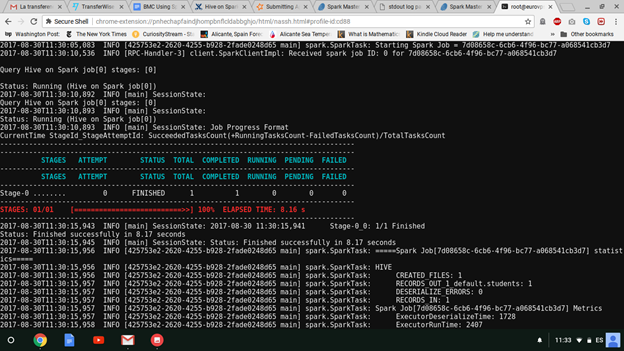
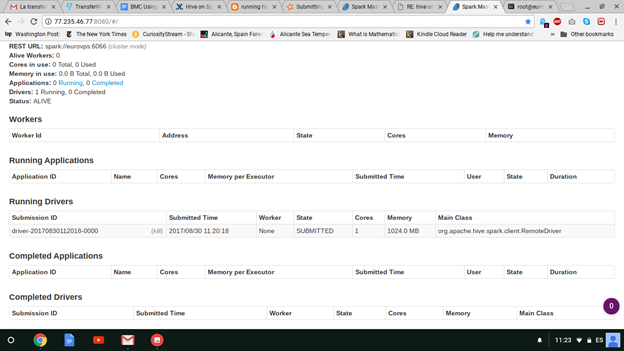
Since it takes some time to get the job started, you have time to open the Spark URL on port 8080 to see running programs. Spark removes those when the job completes unless you run the Spark Job History Server.
Now you are done.
Apache Spark Guide
- Apache Spark's Machine Learning Pipeline: An Introduction
- SGD Linear Regression Example with Apache Spark
- Spark Decision Tree Classifier
- Using Logistic Regression, Scala, and Spark
- How to Use Jupyter Notebooks With Apache Spark
- Using Python and Spark Machine Learning to Do Classification
- How to Write Spark UDFs (User Defined Functions) in Python
- Python Spark ML K-Means Example
- How to Apply Machine Learning to Cybersecurity
- Apache Spark: Working with Streams
- K-means Clustering with Apache Spark
- Using Spark with Hive
- How to use Apache Spark to make predictions for preventive maintenance
These postings are my own and do not necessarily represent BMC's position, strategies, or opinion.