





TL;DR Summary: Push and pull operators in MongoDB are used to modify arrays within documents by adding or removing elements. The $push operator appends values, while the $pull operator removes elements based on specific conditions. This guide explains their syntax, usage, and modifiers like $each, $sort, and $position, providing practical examples for users.
- $push adds values to arrays and can create new arrays if absent.
- $pull removes specified values from arrays based on conditions.
The $push and $pull operators are a part of array operators designed to modify arrays in MongoDB documents. In this tutorial, I’ll show you how the push and pull operators work and how to use them with additional modifiers and conditions.
What are push and pull operators?
Push and Pull are the two operations used to add and remove elements from arrays in MongoDB documents. Pushing and pulling elements are done using the MongoDB $push and $pull operators, respectively:
- The $push operator appends a specified value to an array.
- The $pull operator removes values from an array that matches a specified condition.
Basic syntax of $push operator
{ $push: { : , ... } }
Basic syntax of $pull operator
{ $pull: { : , ... } }
Let’s look at each in more detail, including how they work and how you can use them.
How MongoDB $push operator works
You can see the $push operator takes two arguments:
- The array field
- The value to be appended to the specified array field
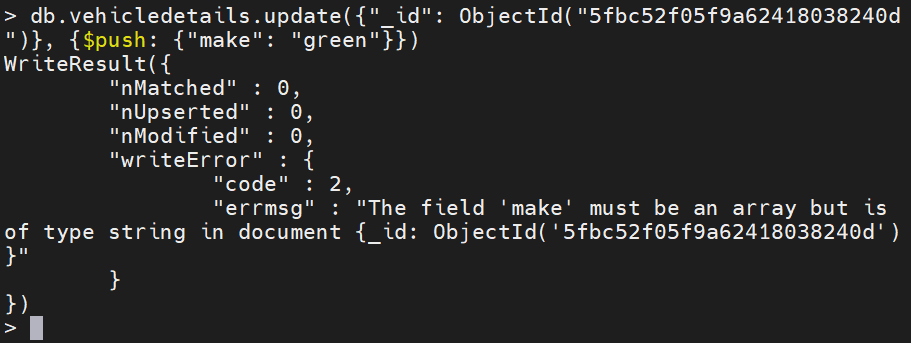
If the array field is not present in the document, the $push operator will create a new array field. However, if the specified field is not an array, MongoDB will return an error.
$push operator modifiers
The functionality of the $push operator can be further extended using the following modifiers.
- $each. The $each modifier is used to append multiple values to an array. If the $each operator is not specified, all values in the $push operator will be appended as a single item to the array field in the document.
- $slice. This limits the number of elements in the array. However, this must be used in conjunction with the $each modifier.
- $sort. The $sort modifiers orders the items in the array. This modifier also requires the use of $each modifier.
- $position. The $push operator appends a new item to the end of an array by default. Use the $position modifier if you want to explicitly specify the location where the item should be appended.
The $push operation is carried out in the following order, regardless of the order in which the modifiers are defined:
- Update the array to add elements in the specified positions.
- Sort the array if $sort modifier is specified.
- Slice the array if $slice modifier is specified.
- Store the array.
Next, we will look at how we can use MongoDB $push operations to manipulate documents. I’ll show a few examples, so jump to the one you need:
- Append a single value to an array
- Append multiple values to an array
- Use the $sort and $slice modifiers
- Use the $position modifier
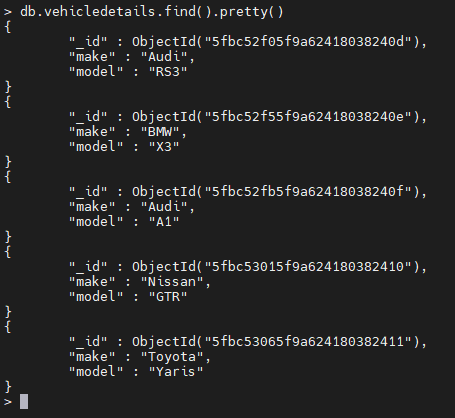
For the base data set for these examples, I’ll use the “vehicledetails” collection.
db.vehicledetails.find().pretty()
Result:
Append a single value to an array
Let us see how we can append a single value to an array when an array field is present, and it's not present. In all examples, the "_id" field is used to indicate which document the array should be added.
Example: No Array Field
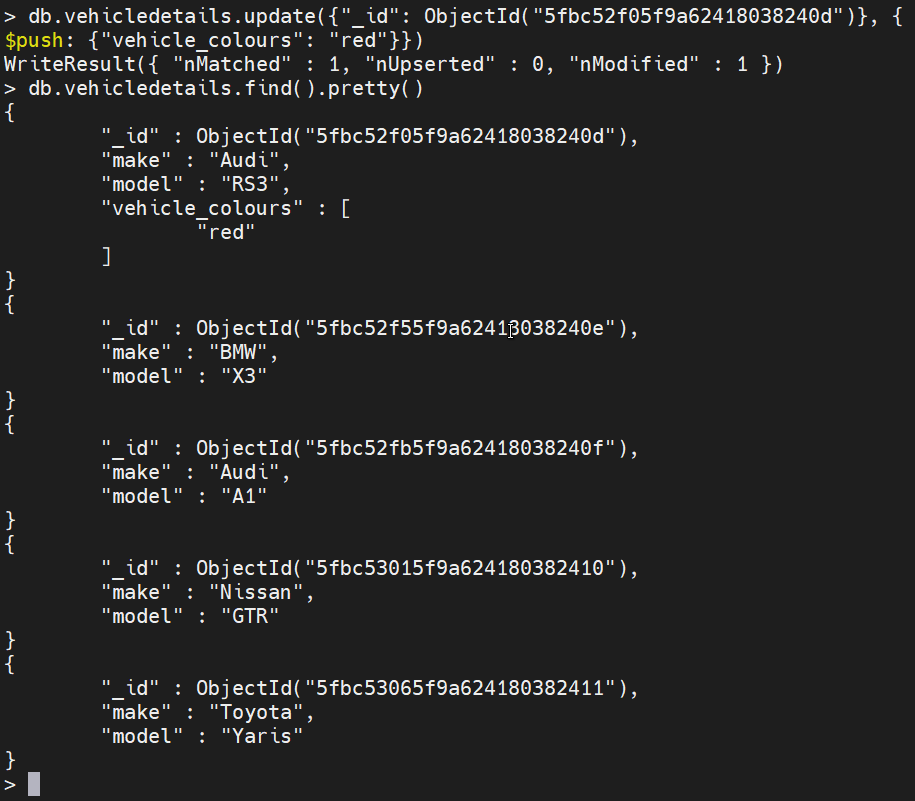
A new array field will be created with the field name specified in the $push operator.
db.vehicledetails.update({"_id": ObjectId("5fbc52f05f9a62418038240d")}, {$push: {"vehicle_colours": "red"}})
Result:
Example: When the array Field is present
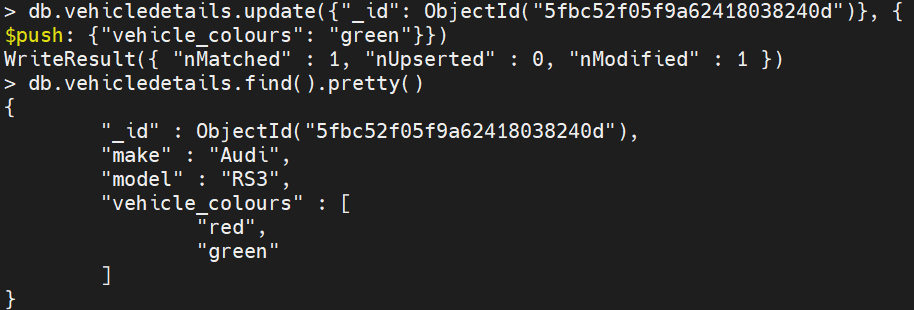
The new item will be appended at the end of the array.
db.vehicledetails.update({"_id": ObjectId("5fbc52f05f9a62418038240d")}, {$push: {"vehicle_colours": "green"}})
Result:
If we try to use the $push operator for a non-array field, it will result in an error. The following code returns an error as we are trying to append a value to the non-array field “make”.
db.vehicledetails.update({"_id": ObjectId("5fbc52f05f9a62418038240d")}, {$push: {"make": "green"}})
Result:
Append Multiple Values to an Array
You can append multiple values to an array with or without $each modifier.
Example: Multiple Values without $each modifier
If the $each modifier is not present, MongoDB will append all the values as a single value to the specified array field.
db.vehicledetails.update({"_id": ObjectId("5fbc52f55f9a62418038240e")}, {$push: {"vehicle_colours": ["blue", "red", "yellow"]}})
Result:
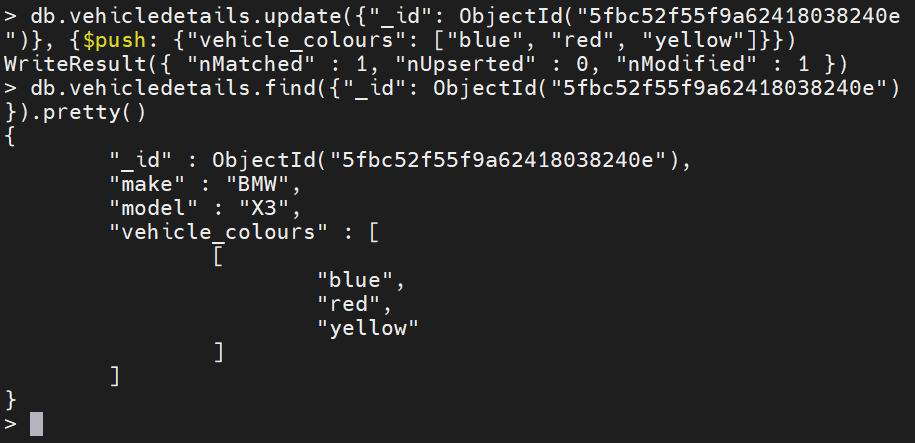
Here, you can see "blue", "red", and "yellow" are elements of a newly created array. But that array is just one element of the "vehical_colours" array.
Example: Multiple Values with $each modifier
When a $push operation is defined with the $each modifier, each element in the $push operation will be added to the array as individual items.
db.vehicledetails.update({"_id": ObjectId("5fbc52f55f9a62418038240e")}, {$push: {"vehicle_colours": { $each :["blue", "red", "yellow"]}}})
Result:
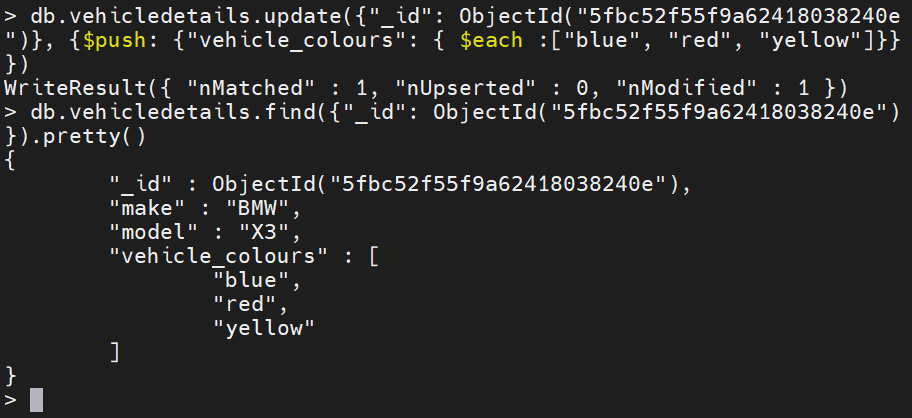
Here, “vehicle_colours” has three elements after $push operation.
Using the $sort and $slice Modifiers
In this section, we will demonstrate how to use the $sort and $slice modifiers using the following document in the “vehicledetails” collection.
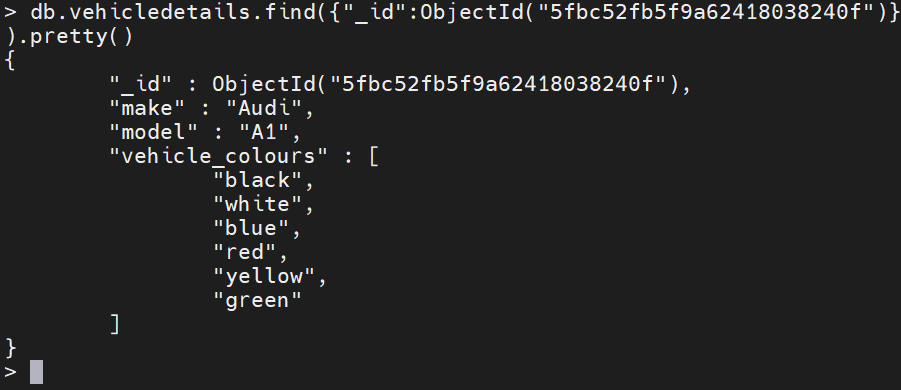
Let us add the color "silver" to the "vehicle_colours" array field and sort the contents alphabetically (ascending order).
db.vehicledetails.update({"_id": ObjectId("5fbc52fb5f9a62418038240f")}, {$push: {"vehicle_colours": { $each :["silver", "orange"], $sort: 1}}})
Result:
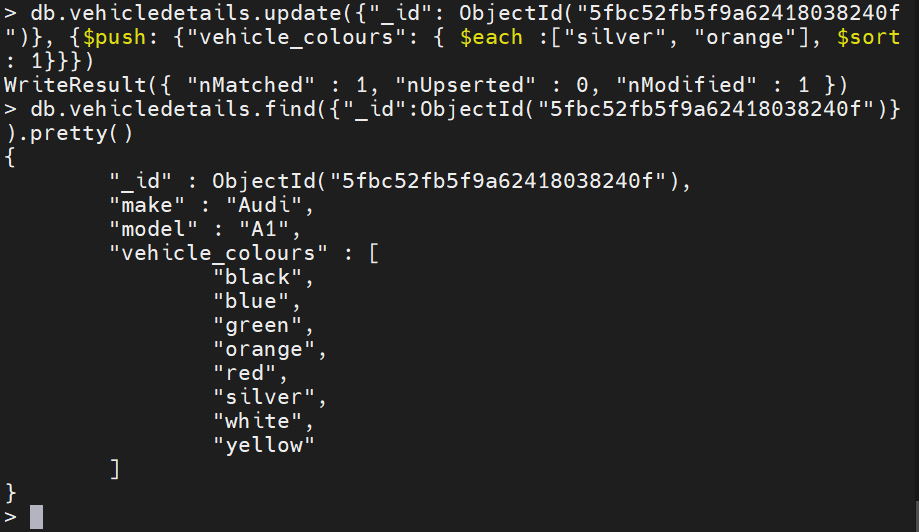
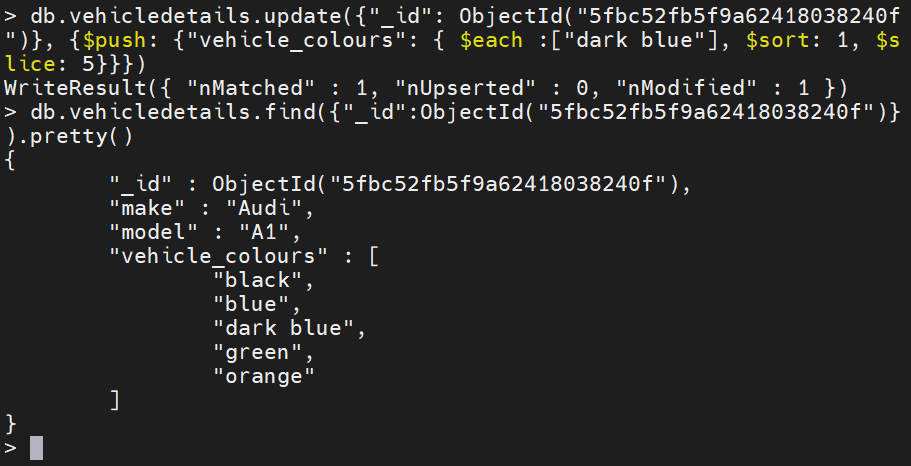
The above output shows us that the new colors were added, and the array has been sorted alphabetically. In the following example, we will add the color "dark blue" to the array field while sorting alphabetically and using the $slice modifier to limit the array to 5 elements.
db.vehicledetails.update({"_id": ObjectId("5fbc52fb5f9a62418038240f")}, {$push: {"vehicle_colours": { $each :["dark blue"], $sort: 1, $slice: 5}}})
Result:
Using the $position Modifier
The $position modifier is used to specify the location in the array where the new item should be added. This will override the default behavior of appending the items to the end of the array.
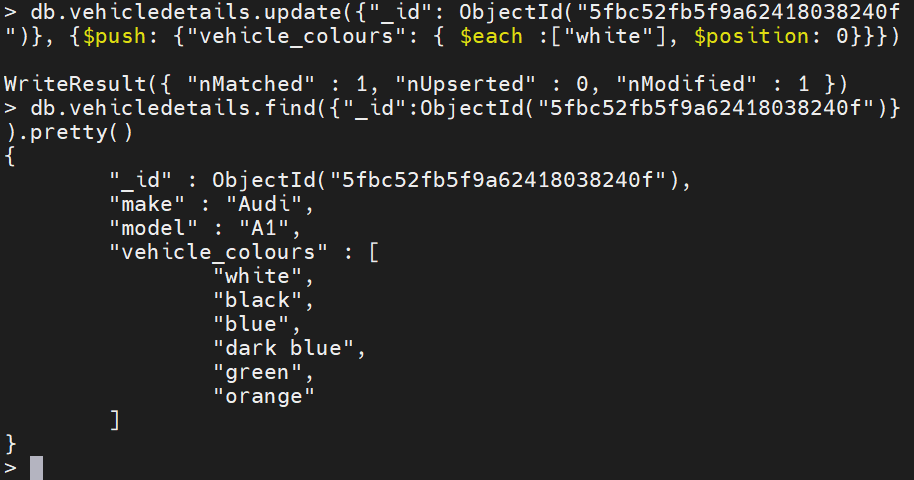
In the following example, we will add the color "white" to the beginning of the array field "vehicle_colours". In the "$position" modifier, zero (0) is used to indicate the first position (index 0) of the array.
db.vehicledetails.update({"_id": ObjectId("5fbc52fb5f9a62418038240f")}, {$push: {"vehicle_colours": { $each :["white"], $position: 0}}})
Result:
How MongoDB $pull operator works
The $pull operator is used to remove all the instances of a value or values from a MongoDB document that matches a specified condition. If an array contains embedded or nested documents, the specified $pull operator condition will be applied to each array element as if each array element were a document in a collection.
When the specified value to be removed is an array, the $pull operator only removes the elements in the array that matches the exact value specified, including the order in which the elements are defined. If the specified value to remove is a document, the $pull operator will remove elements that match the fields and values specified. In this instance order of fields is discarded.
Now I’ll walk you through a few examples of the $pull operator. Jump to the ones you need:
- Remove a single item from an array
- Remove all items that equal a specific value
- Remove items that match a specified $pull
- Remove items from an array of documents
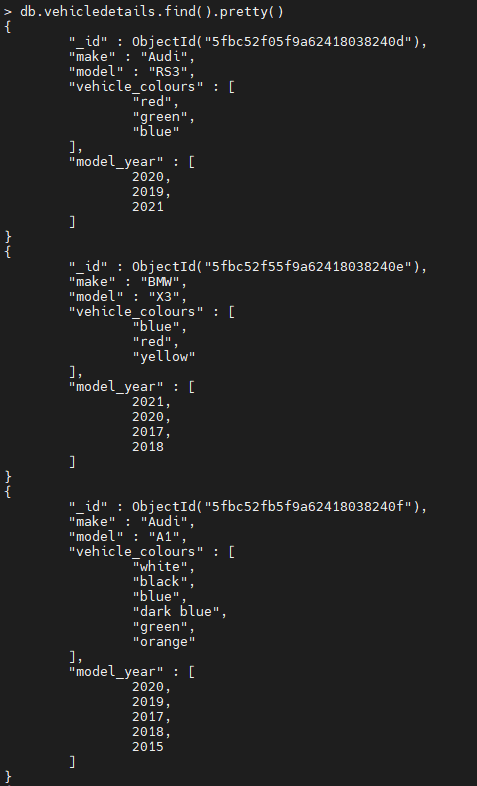
In these examples, we’ll use the following data set to demonstrate:
Remove a single item from an array
Remove a single item from an array
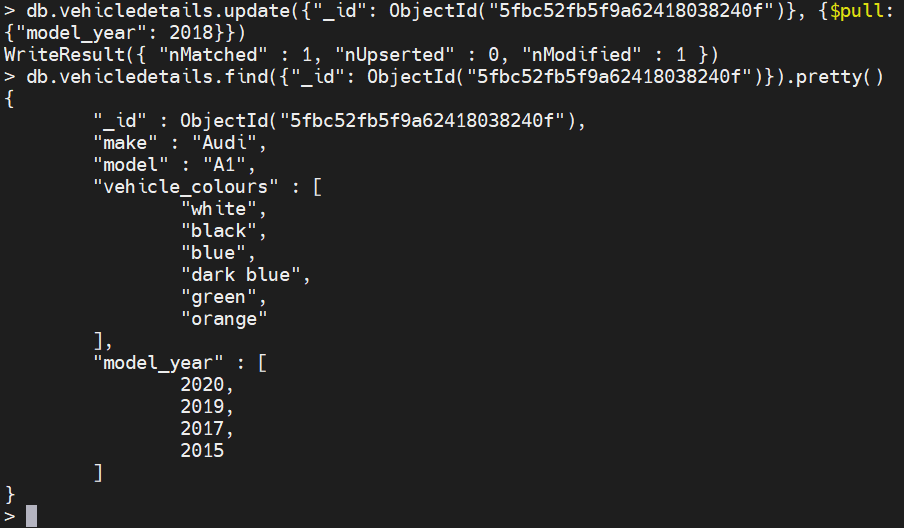
Here, we will remove the single value “2018” from the “model_year” array field. The “_id” field is used to indicate the document on which the $pull operation should occur.
db.vehicledetails.update({"_id": ObjectId("5fbc52fb5f9a62418038240f")}, {$pull: {"model_year": 2018}})
Result:
Remove All Items that Equal a Specified Value
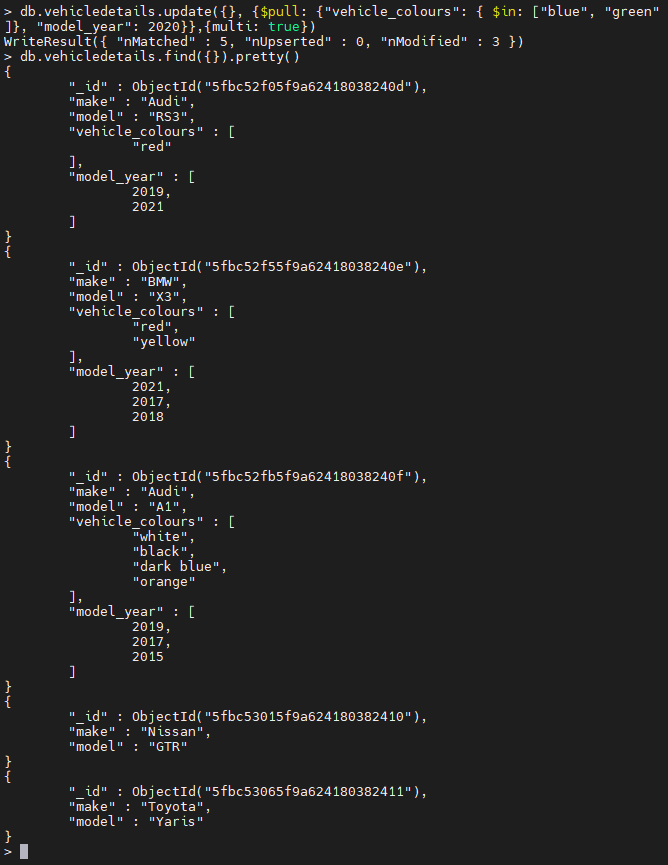
In this example, we will be using the “vehicledetails" collection to remove the colors "blue" and "green" from the "vehicle_colours" array field and remove the model year 2020 from the "model_year" array field.
db.vehicledetails.update({}, {$pull: {"vehicle_colours": { $in: ["blue", "green"]}, "model_year": 2020}},{multi: true})
Result:
Remove Items that Match a Specified $pull Condition
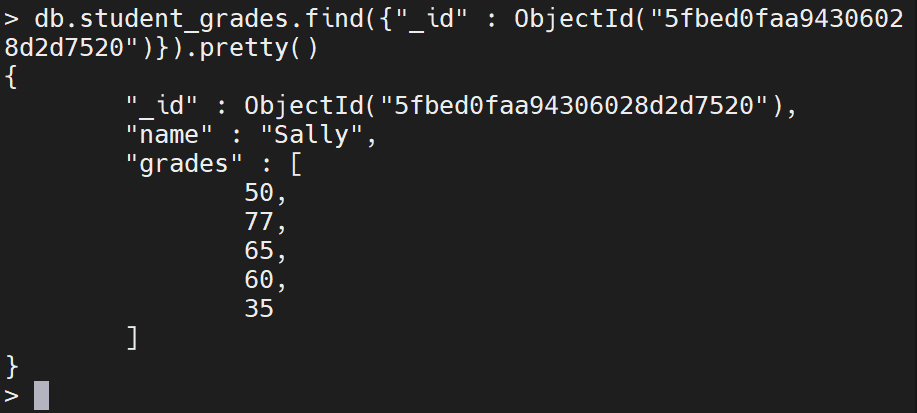
Using the collection “student_grades”, let us create a condition to remove all grades that are less than or equal to 50 from the following document.
Unmodified Document:
Modified Document:
db.student_grades.update({"_id" : ObjectId("5fbed0faa94306028d2d7520")}, {$pull: {"grades": {$lte: 50}}})
Result:
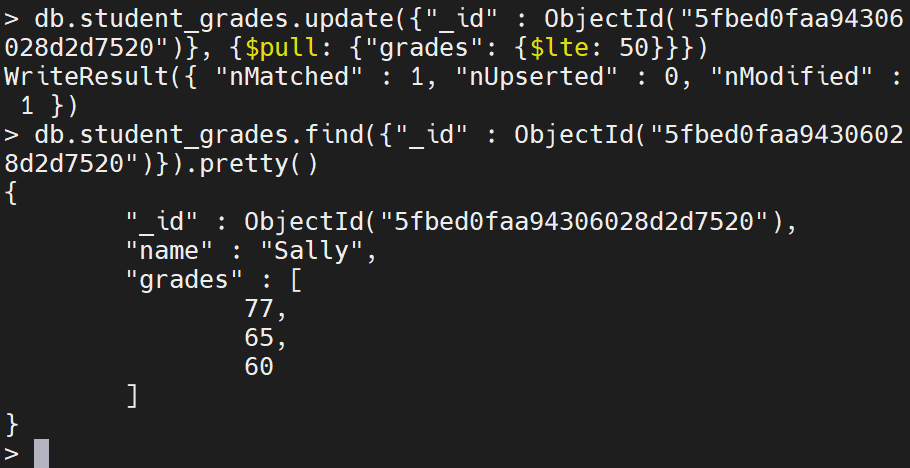
The specified condition ({$lte: 50}) removed any item that is less than or equal to 50 in the “grades” array field.
Remove Items from an Array of Documents
In this example, we will use the “student_grades” collection to remove all the values that are less than or equal to 50 in the “grades” array field in all the documents in the collection.
Unmodified Collection:
Modified Collection:
db.student_grades.update({}, {$pull: {"grades": {$lte: 50}}},{multi: true})
Result:
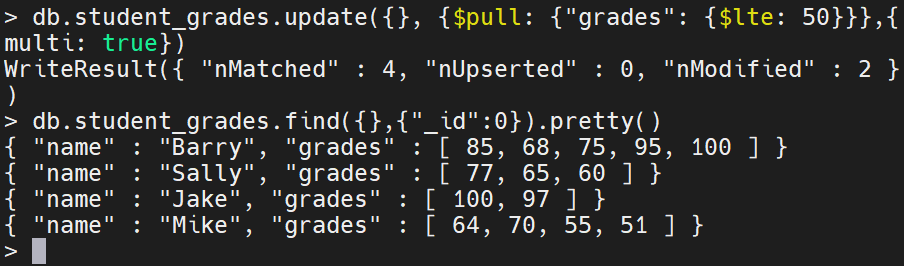
The above output demonstrates to us that any value that is less than or equal to 50 has been removed from the “grades” array field in all documents in the “student_grades” collection.
That concludes this tutorial.
MongoDB Guide
- MongoDB Overview: Getting Started with MongoDB
- How to Install MongoDB on Ubuntu and Mac
- Creating a Database in MongoDB
- MongoDB Shell Basic Commands
- MongoDB Compass: Using the Mongo GUI
- MongoDB Role-Based Access Control (RBAC) Explained
- MongoDB Projection & Projection Operators Explained
- MongoDB Aggregate Functions Explained
- MongoDB Sorting: sort() Method & Examples
- Using Push & Pull Operators in MongoDB
- How To Use MongoDB $unwind
- 23 Common MongoDB Query Operators & How to Use Them
- MongoDB GeoLocation Query Examples
- Introduction to MongoDB Transactions
- MongoDB Indexes: Top Index Types & How to Manage Them
- Top MongoDB Commands You Need to Know
- MongoDB Replication: A Complete Introduction
- How to Setup a MongoDB Cluster
- MongoDB Sharding: Concepts, Examples & Tutorials
- MongoDB Atlas: Setting Up & Using Managed MongoDB
- How To Run MongoDB as a Docker Container
- MongoDB Memory Usage, Management, & Requirements
- How To Use mongodump for MongoDB Backups
- Mongorestore Examples for Restoring MongoDB Backups
- How To Use PyMongo
- How to Use Mongoose for MongoDB & NodeJS
- MongoDB Cheat Sheet
- MongoDB vs Cassandra: NoSQL Databases Compared
- PostgreSQL vs MongoDB: Comparing Databases
- MySQL vs MongoDB: Comparing Databases
- MongoDB Certifications: An Introduction
These postings are my own and do not necessarily represent BMC's position, strategies, or opinion.