Let us know how we can help
Sales & Pricing
Speak to a rep about your business needs

Help & Support
See our product support options
General inquiries and locations
Contact us


 Control-M + Azure Logic Apps
Your Azure Logic Apps workflow starts before a workflow trigger is ever invoked — and it can fail when something upstream breaks. An Azure Blob Storage object never arrives. An Azure Data Factory pipeline misses its overnight completion window. Control-M orchestrates the full chain: Azure Blob Storage arrival, Azure Data Factory processing, Azure Logic Apps execution, and downstream delivery.
common workflow issues
Does this sound like your week?
UPSTREAM DEPENDENCY
The Blob never arrived. Your Logic Apps workflow must not start.
Control-M holds the Azure Logic Apps job behind the required upstream condition and releases it only when the preceding workload completes successfully, preventing an incomplete input from cascading into the rest of the enterprise workflow.
SCHEDULE DEPENDENCY
Data Factory missed 1:00 a.m. Logic Apps is now waiting.
Control-M tracks the Azure Data Factory job and Azure Logic Apps workflow in the same job flow, evaluates their dependency, and starts the Logic Apps job after its prerequisite completes instead of relying on disconnected schedules.
TRANSIENT API FAILURE
Azure returns HTTP 429. A transient limit threatens the workflow.
Control-M can rerun an Azure Logic Apps execution step when configured HTTP response codes such as 429 or 503 occur, using defined rerun intervals and attempt counts to recover from transient failures without immediate operator intervention.
FAILURE RECOVERY
The workflow fails mid-run. Operations should not restart everything.
Control-M monitors the Azure Logic Apps job state and supports restart from the point of failure when rerunning eligible failed jobs, reducing unnecessary reprocessing and helping operations restore the wider business workflow faster.
SLA RISK
Logic Apps succeeded, but the business service is already late.
Control-M places the Azure Logic Apps job inside the end-to-end service flow and applies SLA monitoring across dependent jobs, giving operations visibility beyond one workflow run so teams can identify and act on delivery risk earlier.
Control‑M + Azure Logic Apps
Control‑M + Azure Logic Apps
|
Platform & OS coverage |
Azure Logic Apps Consumption · Azure Logic Apps Standard · Microsoft Azure · Control-M Agent on Linux · Control-M Agent on Windows |
|
Job types supported |
Logic Apps workflow execution · Consumption workflows · Standard workflows (Control-M SaaS and 9.0.22+) · parameterized workflow runs · workflow status tracking · execution logs · restart on rerun |
|
SLA monitoring & alerting |
SLA job attachment · end-to-end SLA tracking · predictive SLA visibility · workflow status monitoring · Control-M alerts · service-level monitoring |
|
Audit trail & access controls |
secure connection profiles · Azure Service Principal · Managed Identity · centralized credential management · Control-M role-based access · execution history · job output |
end-to-end orchestration
One production workflow. Every tool in the stack.
Control-M orchestrates workflows across Azure Logic Apps, Azure Data Factory, Azure Blob Storage, Azure Functions, Azure Service Bus, and enterprise applications in a single job flow — with dependency tracking, SLA visibility, and automated recovery across all of them.
- Cross-tool dependency: Azure Blob Storage → Azure Data Factory → Azure Logic Apps → enterprise application
- Data-aware triggers: file arrival, API event, upstream job completion, message-processing handoff
|
Azure Logic Apps |
run Standard and Consumption workflows · pass JSON parameters · monitor status · retrieve output · manage reruns |
|
Azure Data Factory |
execute pipelines · coordinate dependencies · monitor completion · connect pipeline stages |
|
Kubernetes |
execute pipelines · coordinate dependencies · monitor completion · connect pipeline stages |
|
Azure Blob Storage |
coordinate file arrival · gate downstream processing · connect file-driven workflows |
|
Azure Functions |
execute functions · coordinate dependencies · include serverless processing in job flows |
|
Azure Service Bus |
coordinate messaging workloads · connect event-driven and scheduled processing |
|
Enterprise applications |
sequence downstream processing · enforce dependencies · track end-to-end service delivery |
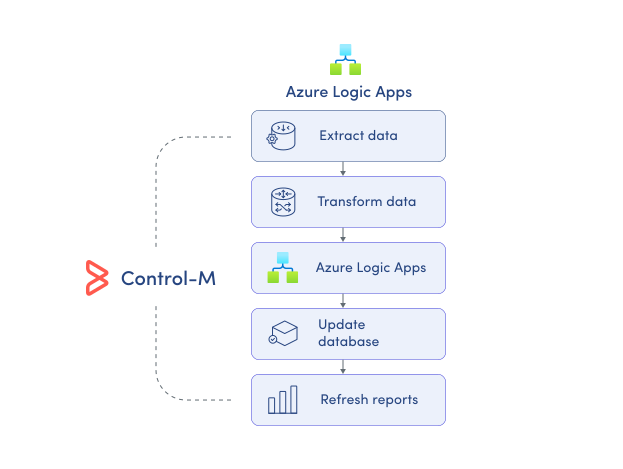
MONITOR WORKFLOWS
Monitor Azure Logic Apps in the wider workflow.
Azure Logic Apps provides run history for its own workflows, but operations teams also need to understand what happened before and after each run. Control-M brings Logic Apps execution into the same operational view as dependent enterprise workloads:
-
Logic Apps job status
-
Workflow results and output
-
Cross-platform dependency visibility
-
End-to-end execution monitoring
-
Centralized operational job view
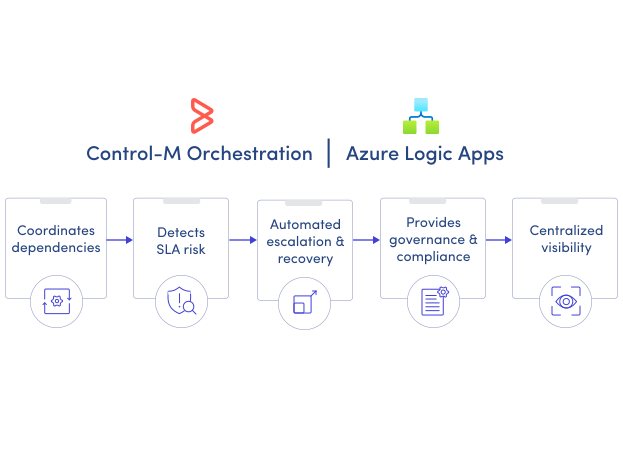
SLA ASSURANCE
Manage the SLA beyond the Logic Apps run.
A successful Logic Apps run does not guarantee the business service finished on time. Control-M connects that execution to its upstream and downstream dependencies and applies service-level monitoring across the complete production workflow:
-
End-to-end SLA tracking
-
Predictive SLA risk visibility
-
Cross-workflow dependency monitoring
-
Automated failure handling
-
Centralized operations oversight
