Let us know how we can help
Sales & Pricing
Speak to a rep about your business needs

Help & Support
See our product support options
General inquiries and locations
Contact us


 Control-M + Amazon Managed Workflows for Apache Airflow (MWAA)
Your Amazon MWAA workflow starts before an Airflow DAG ever runs — and it can fail when something upstream breaks. An Amazon S3 object arrives late. An AWS Glue job misses its processing window. Control-M orchestrates the full chain: S3 data arrival, AWS Glue transformation, Amazon MWAA execution, and downstream delivery.
common workflow issues
Does this sound like your week?
These aren’t edge cases. They’re the normal operating conditions for teams running DynamoDB workloads across multiple tools. Here’s how Control‑M handles each one.
UPSTREAM DEPENDENCY
Your S3 data is late. Your 2:00 AM DAG shouldn’t start.
Control-M makes the DAG dependent on the upstream workflow instead of an isolated clock. It coordinates execution around the required upstream conditions, preventing Amazon MWAA processing from starting before the workflow is ready.
DAG FAILURE
Your DAG failed halfway through. Downstream processing is still waiting.
Control-M monitors Amazon MWAA job status and output, applies configurable status polling and failure tolerance, and prevents dependent jobs from advancing after a failed run — keeping one DAG failure from cascading through the wider workflow.
FAILURE RECOVERY
One task failed. You don’t want to rerun everything.
Control-M supports Amazon MWAA DAG reruns, including failed-task reruns, and can retain the DAG Run ID for recovery. Teams can restart the required processing without manually rebuilding the entire cross-platform workflow.
SLA RISK
The DAG is running. Your 7:00 AM delivery is still at risk.
Control-M attaches SLA management to Amazon MWAA jobs and tracks the DAG within the broader production workflow. Teams can see whether dependencies are threatening the required completion time instead of treating DAG execution as an isolated event.
TROUBLESHOOTING
Your DAG failed. Now you’re jumping between consoles for answers.
Control-M monitors Amazon MWAA status, results, and output and can capture DAG task-instance logs in the Control-M job output. Data teams get execution context where they orchestrate the broader workflow, reducing investigation across disconnected tools.
INTEGRATION FACTS
Control‑M + Amazon Managed Workflows for Apache Airflow (MWAA)
|
workload.types |
Airflow DAG runs · DAG reruns · failed-task reruns · parameterized DAGs · Airflow 2 workflows |
|
trigger.type |
time schedule · upstream job completion · file arrival · Control-M dependency · event-driven workflow · manual execution |
|
cross_tool.deps |
Amazon S3 file arrival · AWS Glue job · Amazon Redshift job · AWS Step Functions workflow · file transfer · REST API call · downstream analytics job |
|
cloud.platforms |
Amazon Web Services · Amazon MWAA · Amazon S3 · AWS IAM · AWS STS · Amazon CloudWatch |
|
error_handling |
DAG rerun · failed-task rerun · configurable status polling · failure tolerance · upstream/downstream rerun scope · task-instance log capture · SLA management |
|
throughput |
multi-DAG orchestration · centralized scheduling · cross-platform production workflows · resource pools |
|
observability |
MWAA job status · results · job output · task-instance logs · DAG Run ID tracking · SLA monitoring · end-to-end workflow monitoring |
end-to-end orchestration
One production workflow. Every tool in the stack.
Control-M orchestrates workflows across Amazon MWAA, Amazon S3, AWS Glue, Amazon Redshift, AWS Step Functions, file transfers, and cloud services in a single job flow — with dependency tracking, SLA visibility, and automated recovery across all of them.
- Cross-tool dependency: Amazon S3 → AWS Glue → Amazon MWAA DAG → Amazon Redshift
- Data-aware triggers: file arrival, API event, upstream job completion, workflow status
|
Amazon MWAA |
run DAG · rerun DAG · pass parameters · monitor status · capture task output |
|
Amazon S3 |
file-arrival dependency · upstream data coordination |
|
AWS Glue |
job orchestration · dependency coordination · status-driven handoff |
|
Amazon Redshift |
data workflow orchestration · downstream dependency · scheduled processing |
|
AWS Step Functions |
workflow execution · status monitoring · dependency coordination |
|
Managed File Transfer |
secure file movement · arrival-driven workflow handoff |
|
REST APIs |
API-driven execution · cross-application workflow coordination |
airflow coexistance
Control-M doesn’t replace your Airflow DAGs. It runs the layer above them.
The objection is common: “We’re already on Airflow.” The issue isn’t what Airflow does – it’s what happens before and after Airflow runs. That’s where pipelines actually fail.
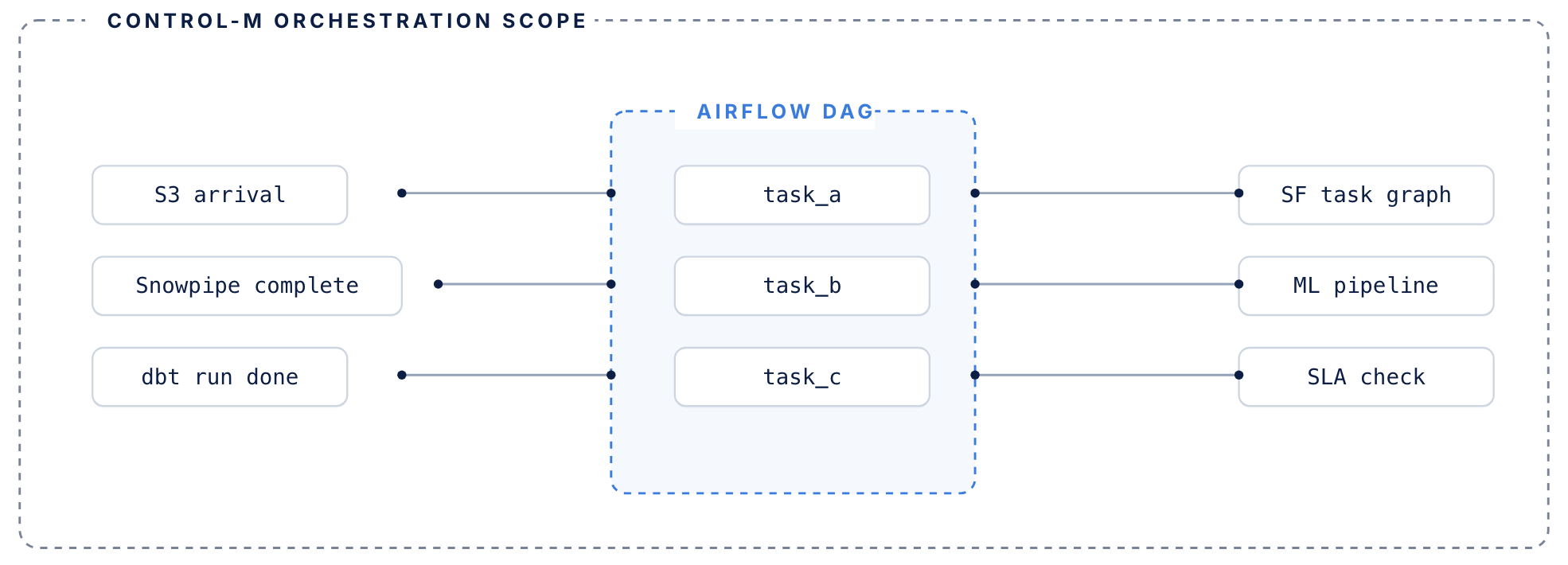
Airflow manages its DAG. Control-M manages everything surrounding it.
airflow handles
DAG-level orchestration inside the data pipeline
- DAG-level task orchestration within data pipelines
- Python operators, sensors, and task dependencies
- Execution graph for jobs that run inside your pipeline
- Manages retries within a single DAG context
control-m adds
The coordination layer around your DAGs
- Coordination layer around DAGs — triggers Airflow based on upstream conditions: file arrivals, API events, other tool completions
- Tracks each DAG’s SLA contribution across the full end-to-end workflow, not just its own routine
- Manages failure recovery when upstream dependencies fail before Airflow even starts
- Existing DAGs don’t need to be rewritten or migrated
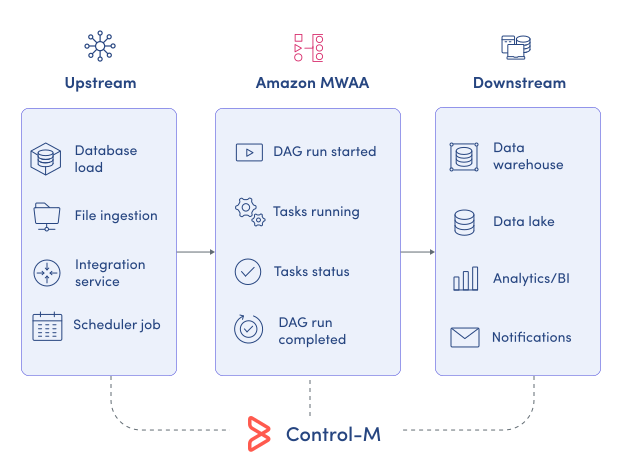
MONITOR PIPELINES
Monitor Amazon MWAA execution in the broader workflow
Amazon MWAA provides Airflow-native monitoring, while production data services often span systems outside the DAG. Control-M brings MWAA job status, results, output, task-instance logs, and surrounding dependencies into the broader orchestration view:
-
Amazon MWAA job status
-
DAG results and output
-
Task-instance log capture
-
Cross-platform dependency visibility
-
DAG Run ID tracking
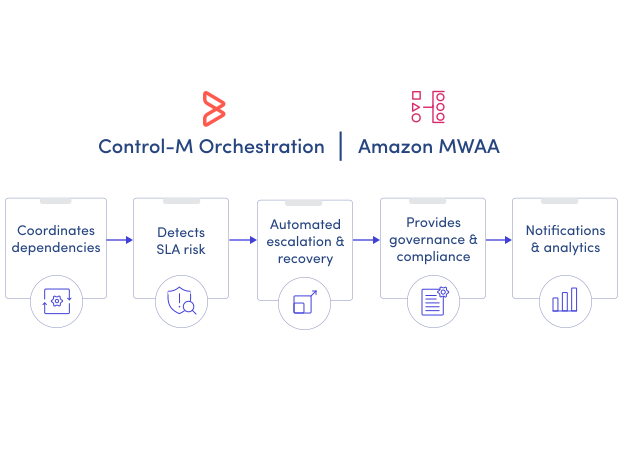
SLA ASSURANCE
Manage Amazon MWAA DAGs against business deadlines
Airflow can manage execution inside a DAG, but the delivery deadline may depend on work before and after it. Control-M applies SLA management to Amazon MWAA jobs within the complete production workflow:
-
End-to-end SLA tracking
-
Cross-tool dependency management
-
Advanced scheduling criteria
-
Failure-aware downstream control
-
Centralized workflow monitoring
Bring order to complex workflows
Learn how Control-M helps teams orchestrate complex processes with greater visibility, coordination, and control.
